
Institute software for PTE, IELTS, CELPIP, DET and TCF
The whole institute, not just the mock tests.
Enquiries, admissions, batches, branches, staff, online class links, study material, AI-scored mocks with feedback, and results, in one admin under your brand. Your students log in to your portal, and you set what they pay.
Prefer to talk? Call +1 (437) 702-0362
- Runs in the browser, nothing to install
- Your logo on your own portal address
- Built in Toronto
- Follow up todayEnquiries4 new from your website form
- 11 minBatch B2 · PTE Academic mock18 of 18 answers scored
- Read before classTeacher briefings6 ready · 2 students behind target
- All branchesBranchesSurrey · Brampton · Chandigarh
- Top upWallet142Mocks left for this month
The exams you teach, in one admin.
Each runs on the exam’s own screen, timers and task types.
AI scoring and feedback on every speaking and writing answer.
Students get a score on the exam’s own scale within minutes, with feedback on what cost them marks. Teachers stop grading at night and spend class time on what the reports show.
How the scoring works- Speaking and writing scored within minutes, for PTE, IELTS, CELPIP, DET and TCF
- Feedback per answer on what cost the marks
- For IELTS, CELPIP and TCF, teachers add their own band from a marking queue; the AI score stays next to it
- A one-page AI report per student for the teacher, charged per report from your wallet
UK CAS interview prep for your students.
Each student builds one profile from their own offer, CAS and money papers, Hilingo scores every practice answer, and your team gets a daily list of who needs a call. Available to institutes in India on request: book a demo and we will switch it on. Elsewhere, ask us.
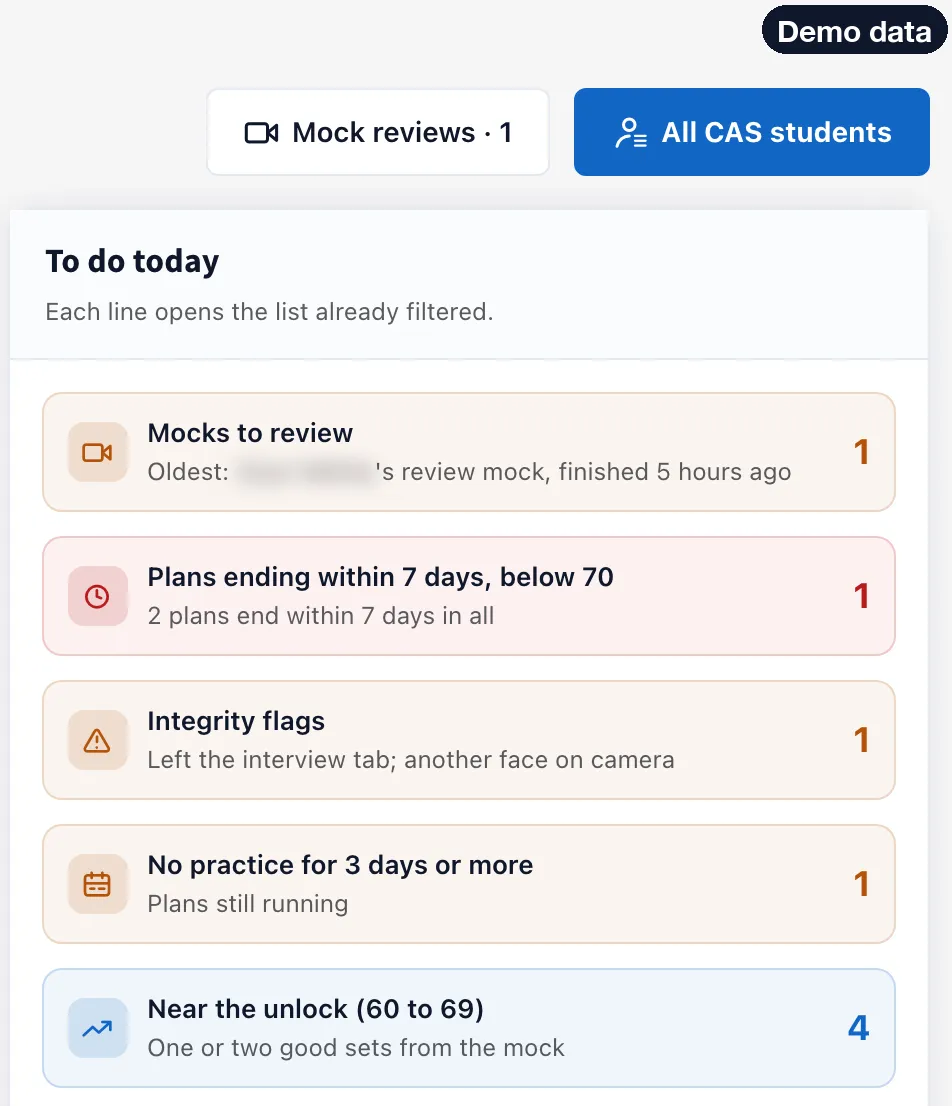
Who needs you first, every morning.
The UK CAS overview ranks your students by need: a plan ending below 70, an integrity flag, a mock to review, no recent practice, a held readiness, or close to the mock unlock.
- Each “To do today” line opens the student list already filtered
- Hilingo scores every practice answer, so counsellors do not sit through every attempt
- Readiness from 0 to 100 beside every name
Before your call, one page.
Open a student and the first thing you see is what is going well and what to work on, with the tip the student was shown.
- Every practice set, with its recordings
- Mock interviews and their bands
- Days left on the plan and how far the student is from the mock

See every answer a student changed.
Answers are built from the student’s own profile. Where a student edits one, you see it beside the original, with removed words in red and added words in green.
- Your whole team coaches from the same numbers
- A changed figure is easy to spot before it turns into a contradiction
- Filter the edited answers by topic

Your trainer’s band next to the AI’s.
A UK CAS Trainer on your staff watches each recorded mock answer and adds Green, Amber or Red with written advice, which is required for Amber and Red. The student sees both bands.
- The trainer’s band is advice and never blocks the student
- Staff see only their assigned students and branches
- A mock the student left part-way can be refunded once

Each student’s UK CAS plan comes out of your prepaid wallet at your plan’s rate. Universities decide whether to issue a CAS and the Home Office decides the visa; Hilingo never promises either.
Who it’s for
Single-branch institutes
Leads, students, batches and mocks in one place, not on phones and spreadsheets.
Institutes with several branches
Each branch keeps its own students and staff. You switch between one branch and all of them.
Study-abroad consultancies
Capture enquiries from ads, walk-ins and a QR code, follow them up, and give students exam practice on your own portal, and prepare them for UK pre-CAS interviews.
Independent trainers
Add students, assign mocks and let the AI score speaking and writing, without building a platform.
The problems an owner actually has.
We built the platform from the owner’s desk, not the student’s screen.
- Leads
“Enquiries arrive on five phones and half are never called back.”
Enquiries from your website, your ads, a walk-in form and a QR code land in one list with a source, an owner, the next follow-up and a stage.
- Scoring
“Teachers spend their evenings grading speaking and writing.”
Our AI scores every speaking and writing answer within minutes and shows what cost the marks. Teachers open a scored batch, not a pile of recordings.
- Branches
“You cannot see what the other branch is doing.”
Branches keep their own students and staff. The owner switches between one branch and all of them; staff see only their branch.
- White label
“Students log in to somebody else’s brand.”
Your logo, colours and favicon on your own portal address, on the mocks and on every score report.
- Wallet
“You pay a vendor per student and control nothing.”
A prepaid wallet in your currency, priced for your market. Students and mocks come out of it at your plan’s rate, and you set what your students pay.
- Staff
“Every staff member can see everything.”
Start from Teacher, Telecaller, Front Desk or Manager and switch each permission on or off. Staff cannot raise their own access, and every action is logged.
Everything the institute runs, in one admin.
Some modules depend on your plan. Your proposal lists exactly which ones you have.
Enquiries and admissions
Enquiries from your website, ads, walk-in form and QR code land in one list with source, owner, next follow-up and stage. Work them as a list, a pipeline board or a calendar. Add students one at a time or by CSV.
Batches
Batches with timing, capacity, a teacher and a mode: offline, online or hybrid.
Study material
Upload files or links, up to 20 at a time, tag them by exam and choose who can open them.
Mocks and practice
Practice by task type, section tests and full mocks on each exam’s own screen and timers. You choose each student’s plan, mocks and validity, and can add mocks or assign tests later.
AI scoring and feedback
Every speaking and writing answer is scored in minutes with feedback on what cost the marks. For IELTS, CELPIP and TCF, teachers add their own band from a marking queue, oldest work first; the AI score stays next to it.
Staff and branches
Preset roles with switchable permissions. Staff see only their branch, cannot change their own access, and every action they take is logged.
Results and reports
Filter results by exam, test type, date and score band, and export them to CSV. A one-page AI report per student for the teacher, charged per report from your wallet.
Messages and support
Banner, popup or bell messages to students by batch, branch, exam or plan, and to staff by branch, with a count of who will get it. Students raise tickets to your team from their portal.
Owner dashboard
Wallet, active students, weekly enquiries and conversion with the week-on-week change; which lead sources convert; today’s follow-ups; students about to expire.
Online classes on the tools you already use.
Schedule a class for a batch or for all students, paste the Zoom or Meet link from your own account, and it shows in each student’s Upcoming list. After class, add the recording link and it moves to Recordings.
- Classes per batch or for the whole institute, with a teacher
- Students see only the classes meant for them
- Recording links kept after the class
- Teachers see only their own classes
Your data, your access.
Students, results and enquiries belong to your institute and are kept separate from every other institute.
- Two-factor sign-in with recovery codes for the admin account
- Staff limited to their branch and permissions, with an activity log
- Export students and results as CSV, and leads as a spreadsheet, at any time
- Close the account yourself from Settings
The economics, plainly.
You buy a portal plan for your market and a prepaid wallet. Students and mocks come out of the wallet at your plan’s per-unit price, and you charge your students what you like. Student pricing is public if you want to see what your learners would otherwise pay.
- Plans and per-student prices set per country, in your currency (INR, CAD, PKR, USD)
- Pay by card where available, or UPI in India
- Numbered tax invoices with GST or HST
- Promo codes on top-ups
- Registered in Ontario, Canada; contracts under Ontario law
How you start
- 01
Book a demo or create your portal
Book a walk-through, or create your portal yourself while sign-up is open. New portals are reviewed within one business day.
- 02
Walk-through and proposal
The admin, teacher and student sides with your exams, then a plan and a wallet priced in your currency.
- 03
Set-up
Branding, branches, staff and students (CSV upload). We can set it up for you.
Questions owners ask us
If yours is not here, put it in the form below and a person answers within one business day.
Do we need to install anything?
No. Admins, teachers and students use it in the browser, on a computer or a phone.
Can we control how many tests each student gets?
Yes. When you add a student you choose the exam, the plan and the validity. From the student’s page you can add mocks, extend validity or assign specific tests.
Can staff see only part of the data?
Yes. Start from Teacher, Telecaller, Front Desk or Manager and switch each permission on or off. Staff see only their branch, cannot change their own access, and every action is logged.
How do online classes work?
You schedule a class for a batch or for everyone and paste the Zoom or Meet link from your own account; Hilingo shows it to the right students and keeps the recording link afterwards. Hilingo does not host the video or take attendance.
Who marks speaking and writing?
Our AI scores every speaking and writing answer within minutes, with feedback. For IELTS, CELPIP and TCF, teachers can add their own band from a marking queue; the AI score is kept next to it.
How long does a student’s access last?
You choose it when you add the student, from the options your plan includes. Your portal’s own validity is set in your proposal.
Can we try it first?
Yes. After the walk-through we set up demo access with your exams.
Who owns the data?
You do. Students, results and enquiries belong to your institute and are kept separate from every other institute. Export students and results as CSV and leads as a spreadsheet whenever you like, and close the account yourself from Settings.
Can we use our own domain?
Every portal gets its own address on hilingo.com with your logo and colours. We connect your own domain once its DNS is in place.
How is it priced?
A portal plan for your market plus a prepaid wallet. Students and mocks are deducted at your plan’s per-unit rate, in INR, CAD, PKR or USD. You decide what to charge your students.
We use another platform. How hard is the move?
Send us your student list and we create the accounts, batches and branches before your walk-through, or upload the list yourself as a CSV.
Can we prepare students for UK pre-CAS interviews?
Yes, for institutes in India, on request: book a demo and we will switch UK CAS on for your institute. Each student builds a profile from their own papers, practises on camera with feedback, and takes mock interviews your trainers can review. Each student comes out of your wallet at your plan’s rate. Elsewhere, ask us.
Do you promise students a CAS or a visa?
No, and your students should not hear that from anyone. Their university decides whether to issue a CAS, and the Home Office decides the visa. Hilingo’s readiness, bands and mock results are practice, not a prediction of either.
Where is the company?
Central Business & Technology Inc., Toronto, Ontario. Contracts are under Ontario law, and support answers within one business day.
See it with your own exams.
Tell us which exams you teach and roughly how many students you have. We reply within one business day with a time and a proposal.
Prefer to talk? Call +1 (437) 702-0362
Book an institute demo
A walk-through of the admin, teacher and student sides, then a proposal priced for your country. We reply within one business day.